Amaia Cuida Preferences → Care and Life Plan
From knowing preferences to turning them into care decisions
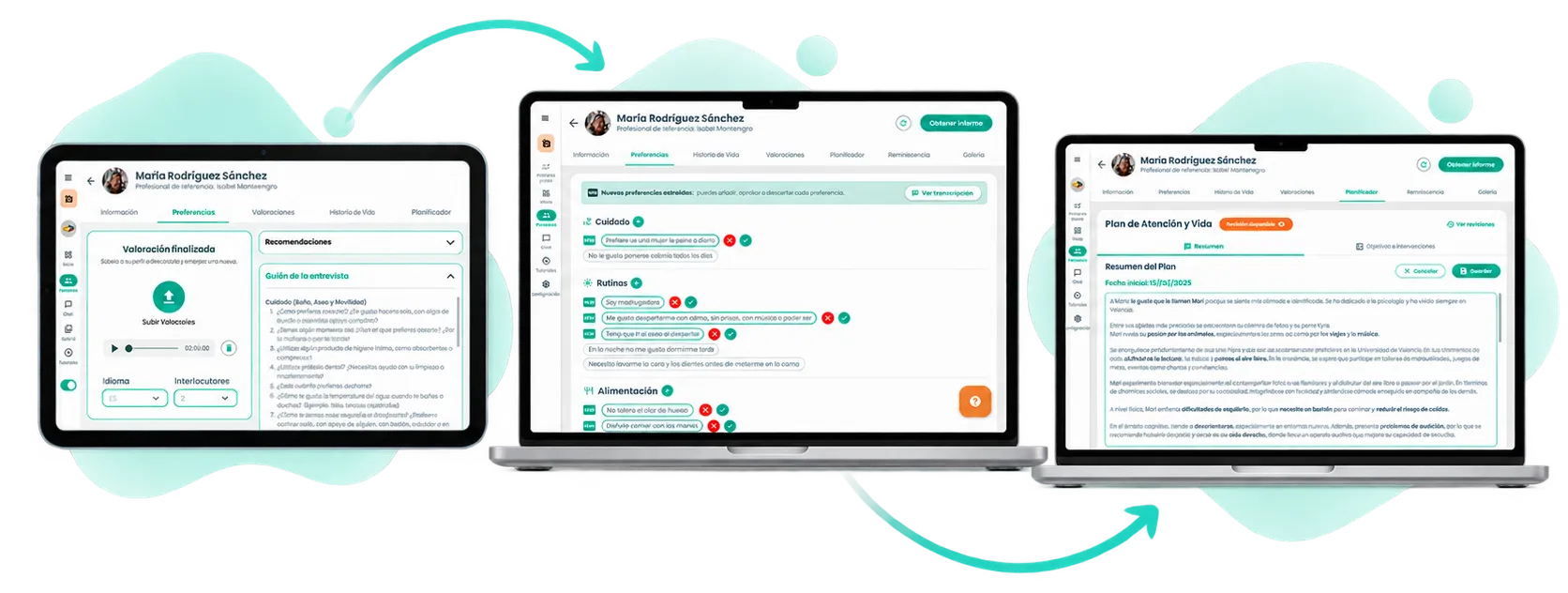
Amaia Cuida helps centers and care homes apply Person-Centred Care (PCC), connecting personal information with care decisions.
A person’s preferences used to be recorded manually, one by one, but collecting that information wasn’t enough if it was later not taken into account within their Care Plan.
The challenge was to design a flow that would make it faster to collect those preferences, analyse them with AI and turn them into useful information to enrich the Care and Life Plan (PAyV), while always keeping professional validation.
- Interview
- Group
- Validate
- Apply
Product screens are shown in their original Spanish.
- My role
- Product Designer UX/UI
- Duration
- 2 years
- 2023–2025
- Team
- CEO, Frontend, Backend and Customer Success
- Products
- 3 platforms
- Amaia Profesionales (web)
- Amaia Conecta (tablet)
- Amaia App (families)
01 The starting point
Recording preferences didn't guarantee they were used in care
Preferences were already part of each person’s profile, but they had to be recorded manually one by one. In an environment with little available time, completing that information could become a task that was hard to keep up.
What’s more, collecting them didn’t solve the whole problem. The information stayed available within the profile, but it wasn’t connected to the Care and Life Plan, so knowing how a person wanted to live didn’t necessarily mean those preferences ended up reflected in their care planning.
The challenge therefore had two parts:
Reducing the effort needed to collect preferences, and making sure that information could later be used to personalise the care plan.
The problem wasn't just collecting more information, but making sure that knowing the person better actually changed how their care was planned.

02 Making it easier to collect preferences
From recording data one by one to holding a guided conversation
Until then, adding preferences depended on the professional identifying and manually adding them to the profile.
To reduce that work, we designed a specific Preferences interview in Amaia Conecta, the device professionals used to carry out assessments together with the person.
Instead of filling in each preference in isolation, the professional could hold a conversation, record it and rely on a question script to explore different aspects of the person’s daily life.
The goal wasn’t to replace the conversation with a rigid questionnaire, but to give the interview structure and make sure relevant information didn’t depend solely on what the professional remembered to record afterwards.
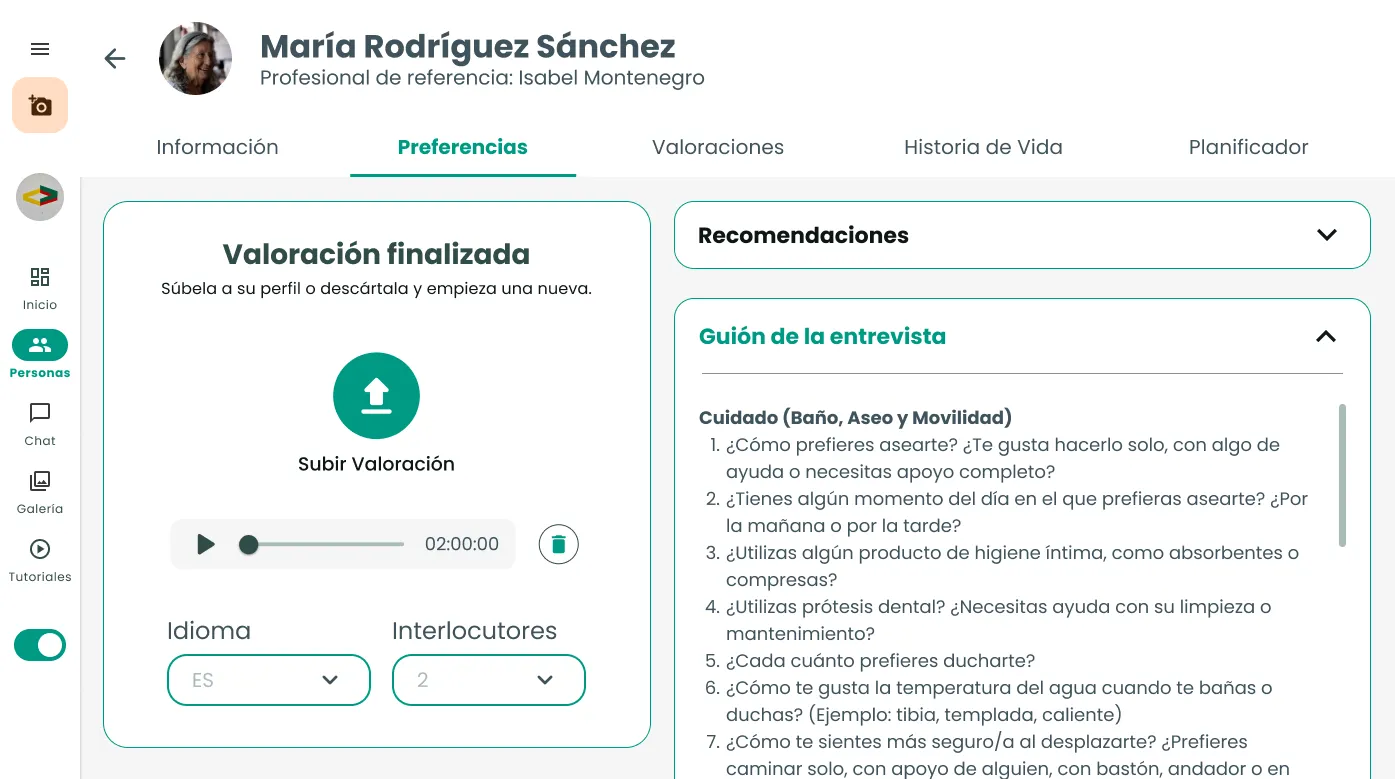
- 01 Interview recordingThe conversation is recorded so it can be processed afterwards.
- 02 Script as supportQuestions organised by topic help the professional guide the conversation.
- 03 Validation before sendingLanguage, speakers and audio can be reviewed before uploading the assessment.
Collecting more information didn’t solve the problem yet. A lengthy conversation had to be turned into specific preferences that the professional could review and use.
03 From conversation to structured information
AI extracts. The professional decides what gets incorporated.
Once the interview was uploaded, the AI analysed the conversation and extracted the detected preferences, grouping them into categories such as care, routines or food.
Instead of forcing the professional to listen back to the whole interview and transfer each piece of data manually, Amaia presented the new preferences directly within the profile.
But the extraction wasn’t incorporated automatically.
Each new preference was flagged so the professional could review it, approve it or discard it before it was definitively incorporated.
AI reduced the extraction work; the professional kept control over which information became part of the profile.
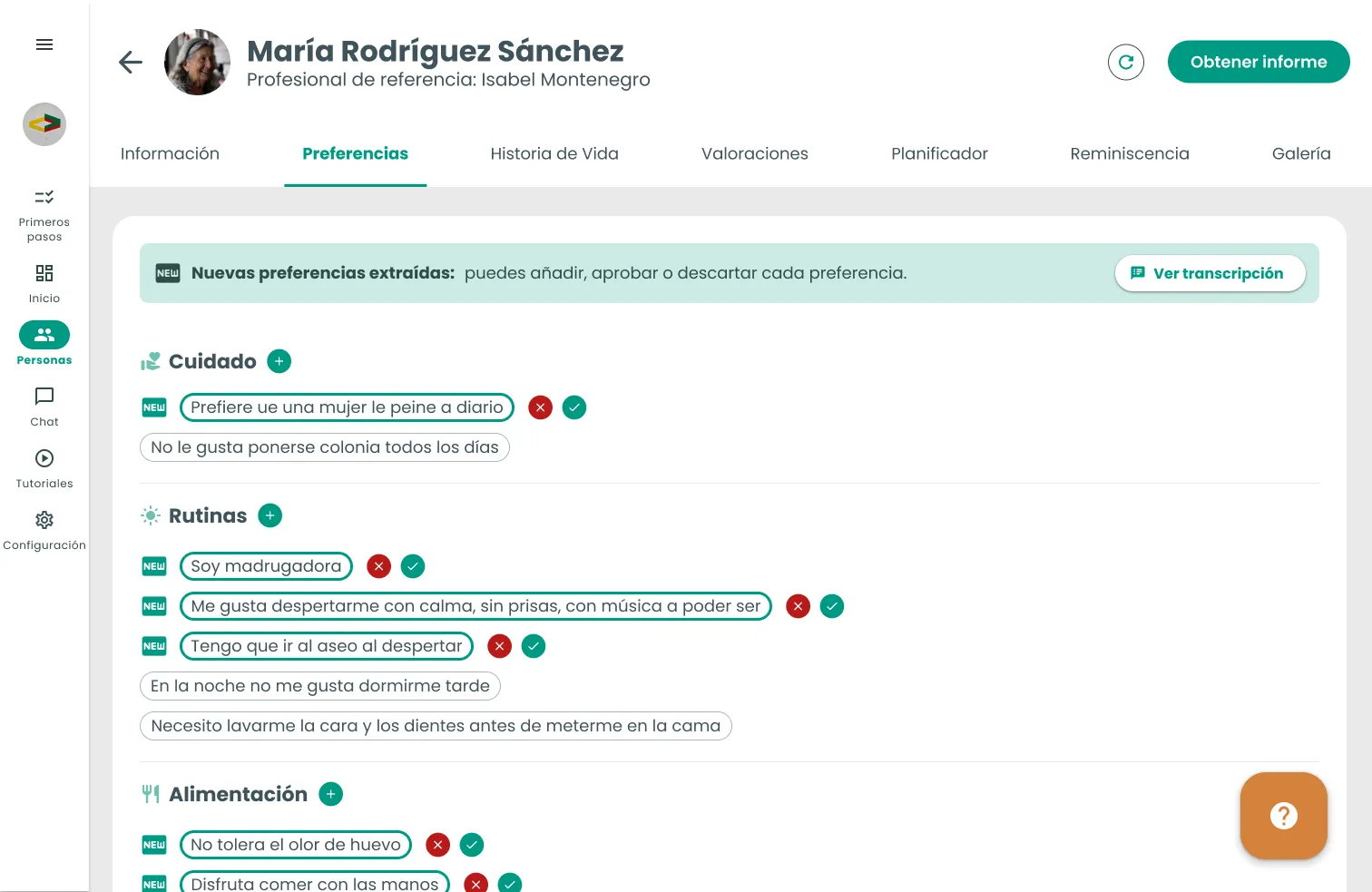
- 01 New preferences detectedPreferences extracted from the interview are distinguished from content that already existed.
- 02 Grouped informationCategories make review easier.
- 03 Approve or discardEach new preference can be validated individually.
- 04 Cross-check against the interview"Ver transcripción" (View transcript) lets you check the context when needed.
Automating without closing the system
Professionals could still add information manually when it came up during the day-to-day or didn’t come from an interview.
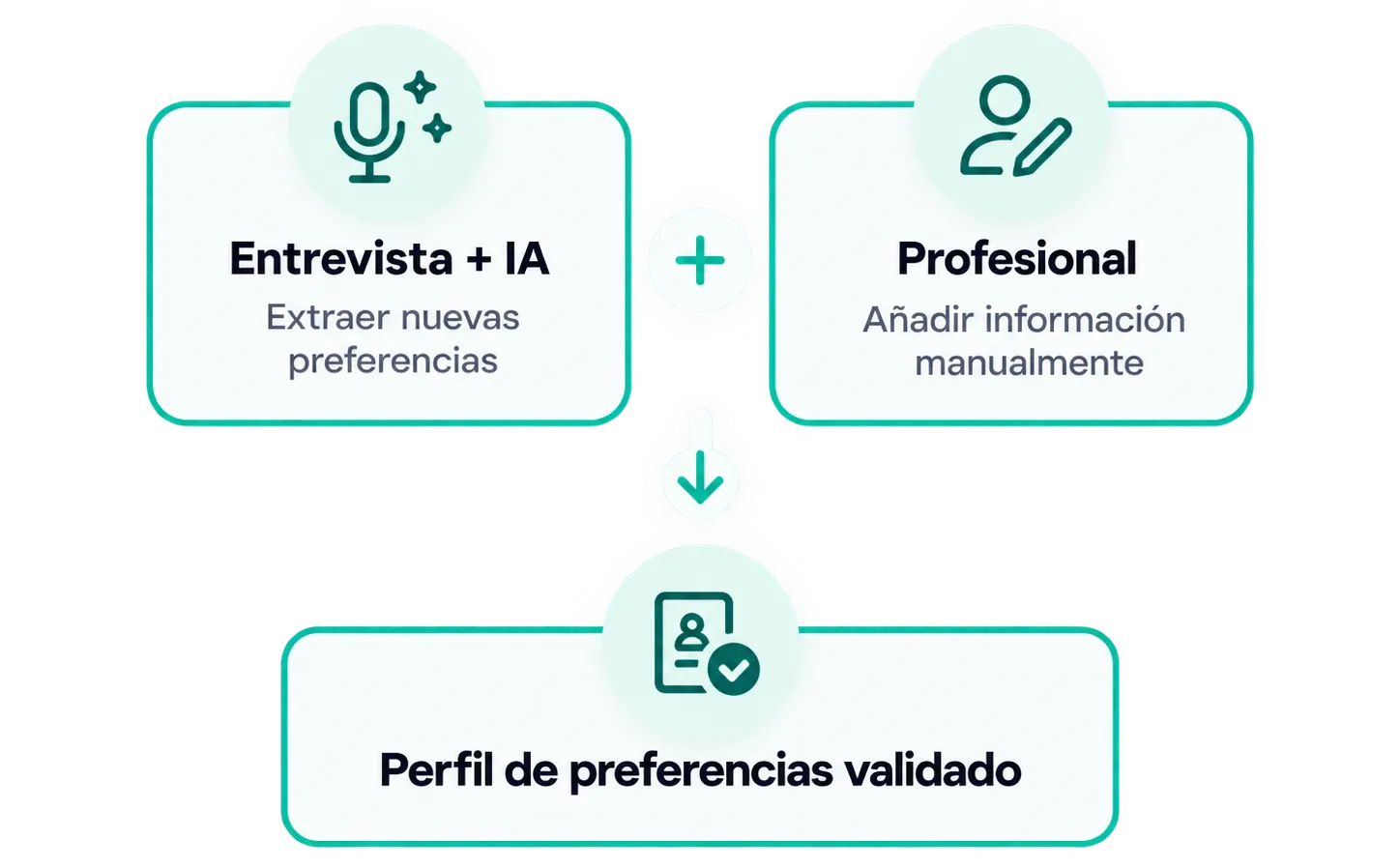
This made it possible to combine two ways of feeding the profile:
AI to speed up extraction from interviews
+
manual editing to keep information alive
We had already reduced the effort needed to collect and structure preferences. The next challenge was making sure that information didn’t end up isolated within the profile again.
04 Connecting the information with the Care and Life Plan
A plan that evolves as we get to know the person better
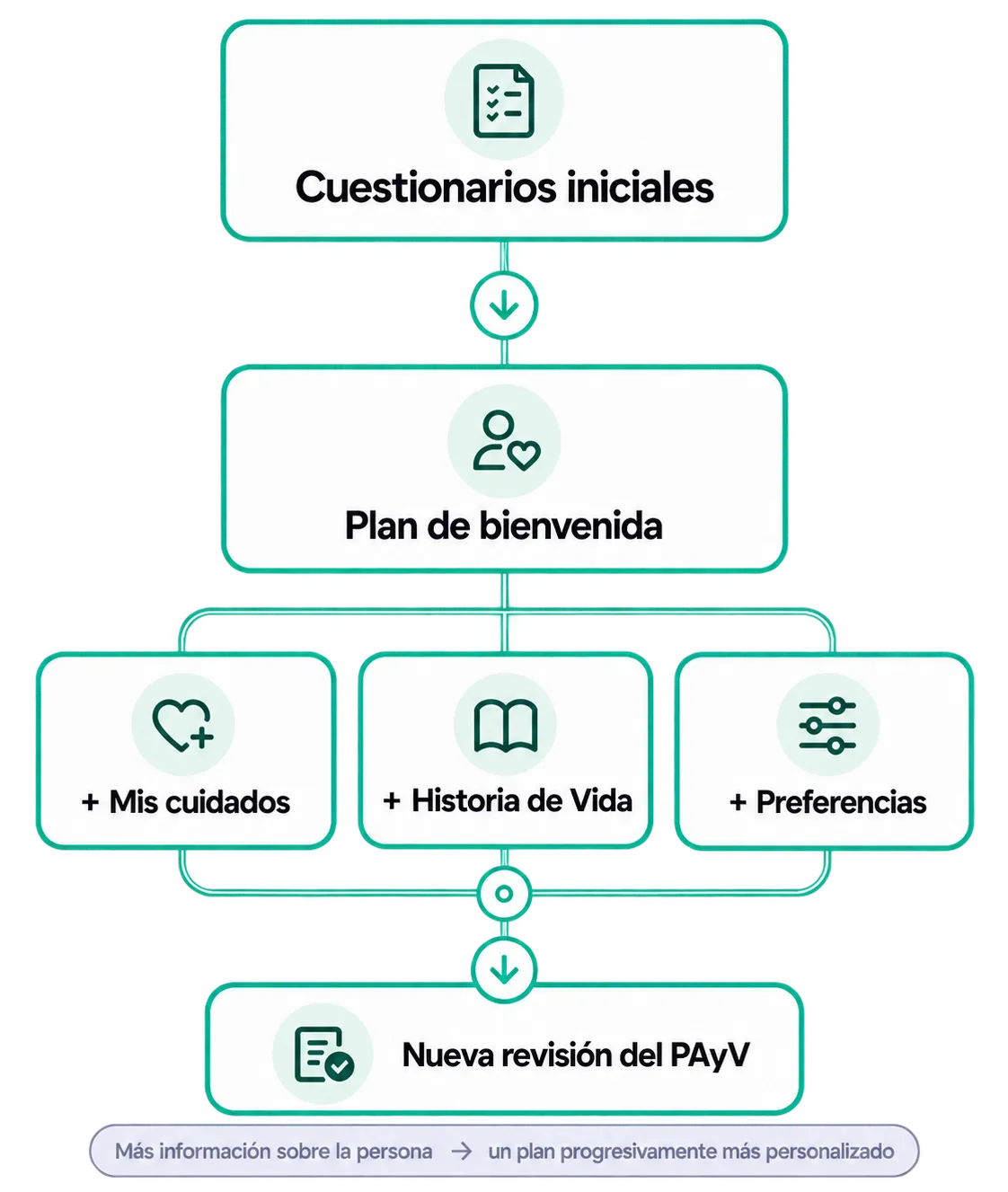
Amaia’s Care and Life Plan wasn’t designed as a document the professional had to build from scratch. It was generated and evolved as more information about the person became available.
A first, basic version — the Welcome Plan — was generated from the initial questionnaires. From there, completing a Life Story, a My Care interview or adding new Preferences could provide enough information to generate a new revision of the PAyV.
The logic had to work regardless of the order in which these sources were completed: any new relevant information could keep enriching the plan.
Preferences had to genuinely influence the plan
Although the PAyV could be enriched from different sources, Preferences had a particular problem.
They were already considered relevant information for personalising the plan, but recording them manually one by one took too much time, so many profiles contained little information of this kind.
What’s more, even when new preferences existed, the system could indicate there was a new revision available without actually incorporating them into the content of the PAyV.
Making it easier to collect them had little value if that information then ended up isolated again. That’s why the redesign didn’t end with the interview and AI extraction: we also worked on the connection between validated preferences and the next revision of the plan.

Reviewing before incorporating the changes
Amaia generating a new version from Life Story, My Care or Preferences didn’t mean the changes had to be accepted automatically.
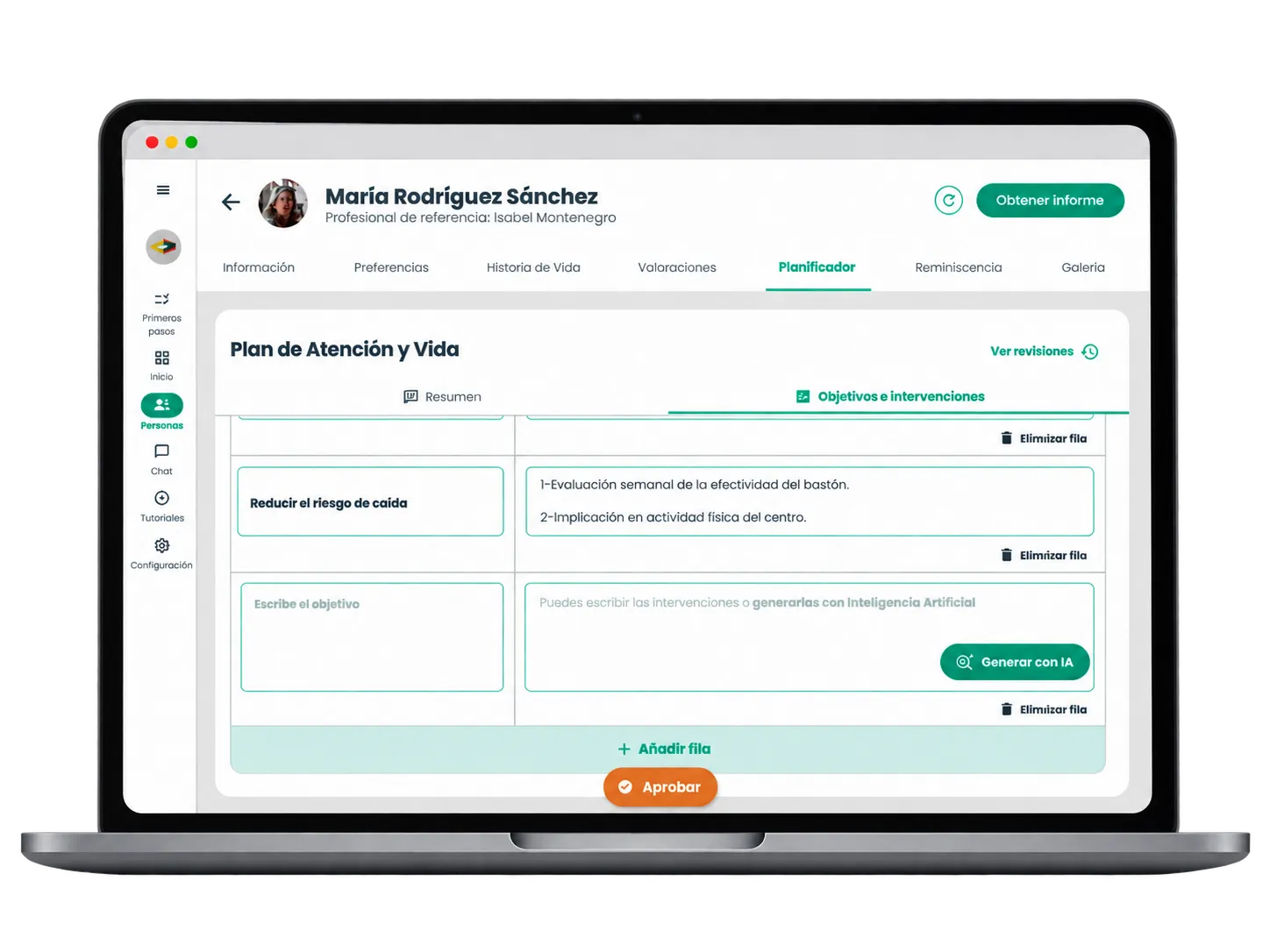
Before approving it, the professional could review and edit both the Plan Summary and the Goals and interventions, removing proposals that didn’t fit, modifying them or adding new actions based on the person’s reality and the resources available at the center.
The logic held throughout the whole journey:
Amaia connected and proposed information; the professional decided what ended up as part of the plan.

AI could also help build the interventions
Editing wasn’t limited to correcting generated content.
The professional could also define a new goal and ask the AI for proposed related interventions, using them as a starting point to then modify, remove or adapt them to the center’s real context.
So AI could help both turn information about the person into a plan proposal and support the professional when they needed to develop new actions, without replacing their judgement.
Validating the flow in the centers' real context
We ran 6 test sessions with professionals from 5 centers to see not only whether they could use the Planner, but how it fit within their real care-planning process.
The sessions showed that the general logic was understood and that professionals valued having a base to review, select and adapt information from, rather than building the plan from scratch.
The main friction points appeared elsewhere: discovering some of the interface’s capabilities, prioritising the information that was genuinely actionable, and making the PAyV reach beyond planning into everyday care.
01 AI as support, not as decision
Automation could recover and structure information that would otherwise go unnoticed, but professional validation remained essential.
As an example, at Center E it was valued that during a conversation the AI could detect preferences the professional might not have identified or classified manually.
02 Valuable features, but not very visible
Some of the capabilities with the greatest potential weren’t always discovered on their own.
At Center F, the professional was about to write the interventions manually and discovered the "Generar con IA" (Generate with AI) help during the test itself.
The same pattern appeared at Center A.
03 Less text, more action
Information worked better when it was short, structured and easy to turn into a care decision.
At Center E they asked for preferences to be shorter and more schematic to make them easier to read.
At Center C we also observed that Goals and interventions got more attention than a summary perceived as too similar to Life Story.
04 The challenge continued after approval
Generating a good PAyV didn’t guarantee that knowledge reached everyday care.
At Center F they identified bringing what was worked on in planning into the care home’s daily routine as one of their biggest difficulties. Some information kept circulating through mechanisms such as post-its or incident logs.
At Center D, the same challenge appeared from another angle: getting more care assistants involved in collecting and using this information also depended on care workload and the team’s capacity to bring new tools into their routine.
The goal wasn’t to generate more versions of the plan, but to make sure every new piece of information about the person could translate into more personalised care decisions.
05 Result
From collecting information to using it to personalise care
The work connected pieces that had previously worked too independently of each other.
The interview made it possible to collect preferences through a conversation, AI helped turn them into structured information, and the professional kept control over what should be incorporated into the profile.
From there, Preferences became part of a broader logic alongside Life Story and My Care: new information about the person could trigger a revision and progressively enrich their Care and Life Plan.
The result was a flow in which knowing the person better could have a direct consequence on how their care was planned.
- 01 Less registration work
A conversation could turn into multiple preferences without having to identify and record them manually one by one.
AI took on part of the extraction and classification work, reducing the effort needed to structure the information.
- 02 Connected information
Preferences stopped working solely as data stored within the profile.
Alongside Life Story and My Care, they could become a new source of information to review and enrich the PAyV.
- 03 The professional keeps control
Automating didn’t mean removing human review.
Extracted preferences had to be validated, and the PAyV’s proposals could be reviewed, edited or discarded before becoming part of the final plan.

What I learned
The value of collecting information lies in what the product then lets you do with it.
At first, the problem seemed to centre on making it easier to record preferences. But automating that task wasn’t enough if the result ended up isolated in another section of the profile.
Designing this flow led me to think of AI as part of a connected system: collecting information, structuring it, validating it and making sure it can influence a later decision, keeping professional judgement at every critical point.