Wedify Product Design / UX/UI
Redesigning a complex platform to make it understandable and scalable
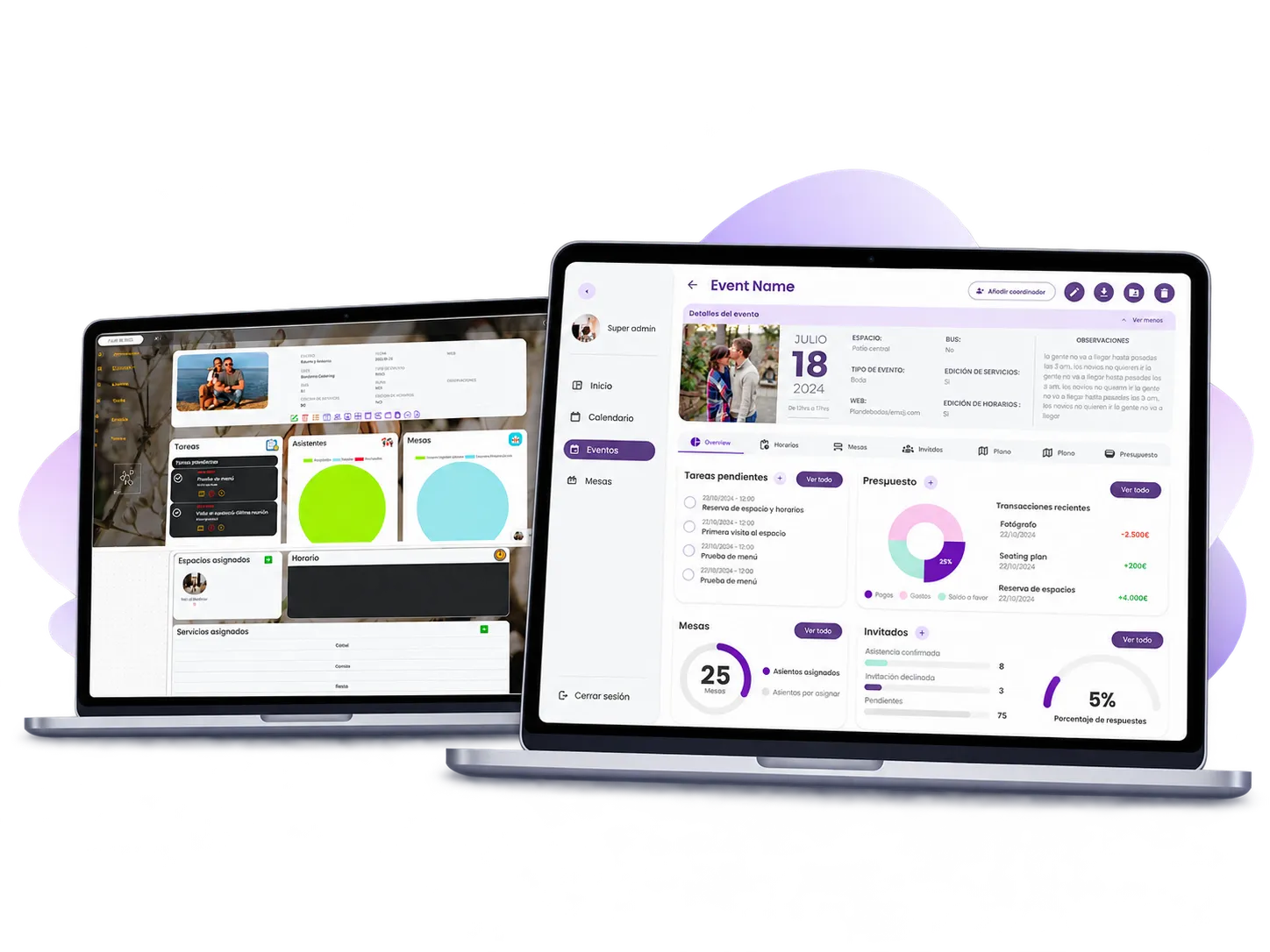
Wedify — formerly Plan de Bodas — is a platform for centralizing the management of weddings and other events across venues, teams, and clients.
The previous version brought together many features, but its architecture and navigation made it hard to understand what each profile was supposed to do and where to find it. Part of the setup — especially loading each venue’s services — ended up depending on the platform’s own team.
The project involved rethinking the whole experience: reorganizing the architecture, adapting the interface to different levels of responsibility, and turning complex processes into clearer, reusable flows.
- Architecture
- Roles
- Services
- Self-service
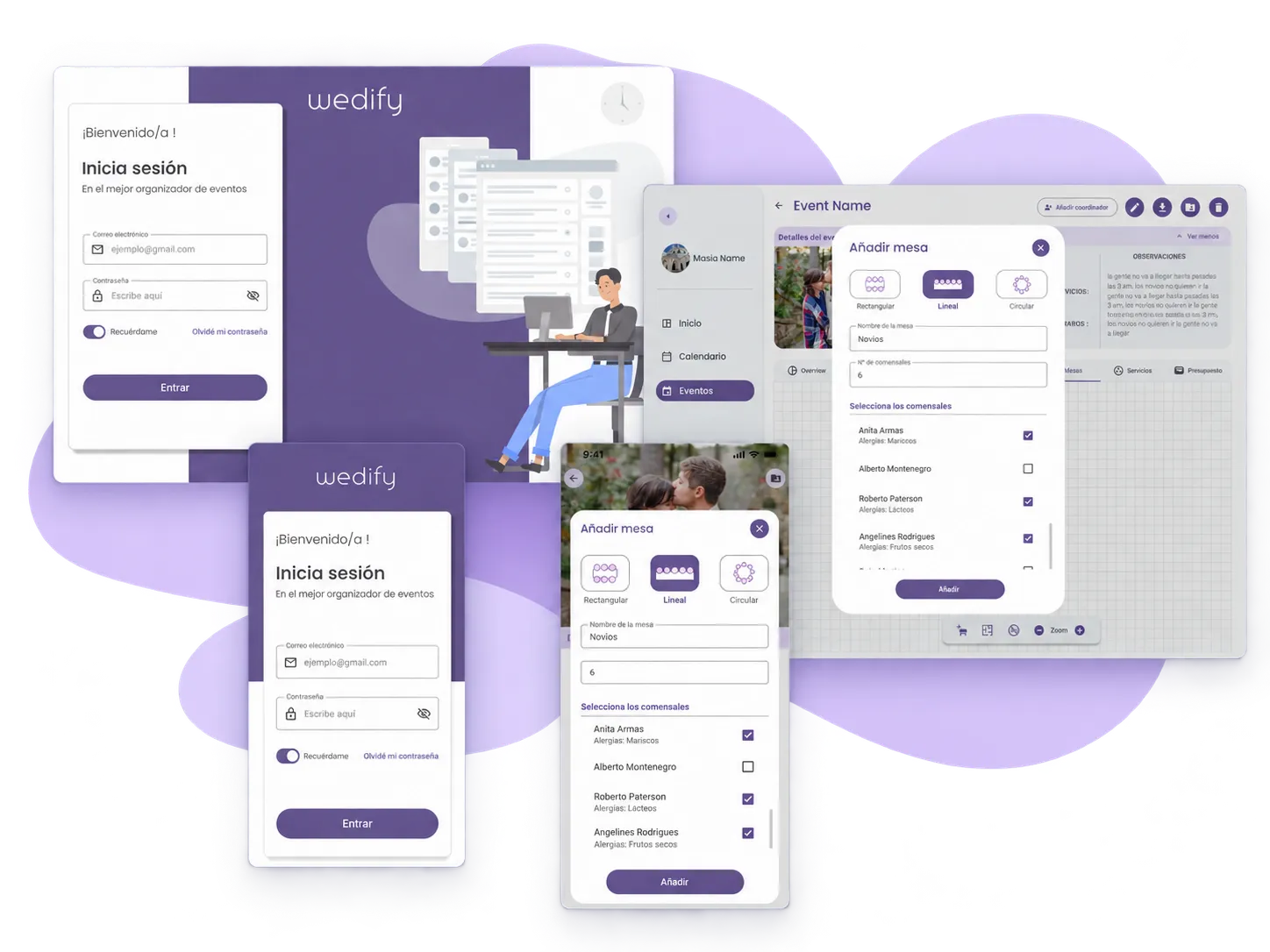
Product screens are shown in their original Spanish.
- Role
- Lead Product Designer UX/UI
- Type
- Paid freelance project
- Period
- Oct 2024 – Apr 2025
- Platforms
- Web + Mobile
01 The starting point
A platform with many features, but hard to understand
Plan de Bodas already made it possible to manage most of a wedding: events, venues, spaces, services, tasks, attendees, or tables. The problem wasn’t a lack of features, but how they were organized.
Sections that belonged to different contexts sat side by side at the same level within the main navigation. When entering an event, modules, actions, and icons competed for attention and required already knowing the system’s internal logic to know where to act.
The complexity also repeated itself inside the forms. Creating or editing information meant facing dense screens, with little prioritization and many decisions visible at the same time.
With few clients using the platform, part of the operation also still depended on the previous owner, who manually loaded each venue’s services so they could later be used in their events.
The redesign couldn't just be about making the interface cleaner: how the product was understood had to be reorganized.
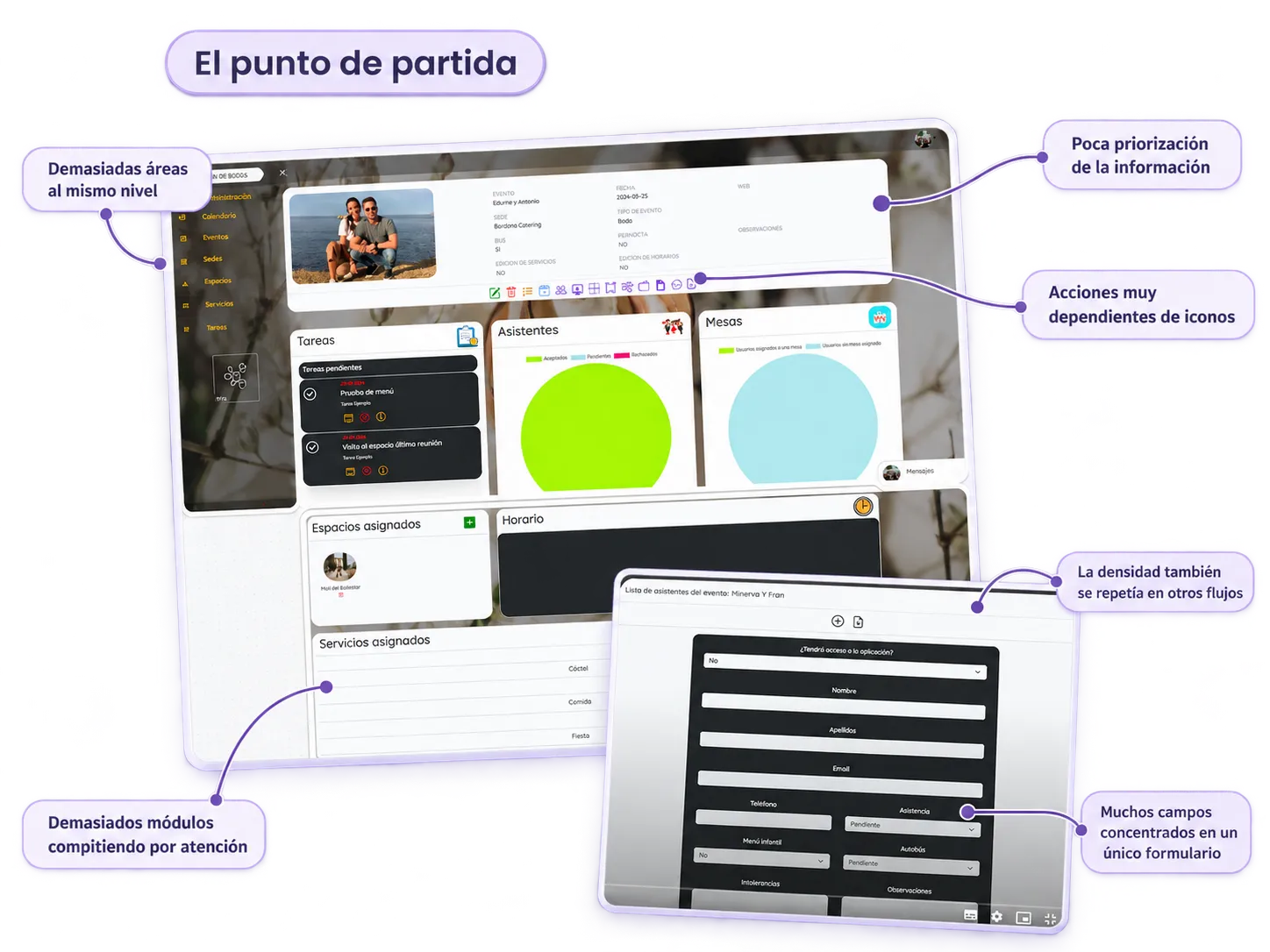
The challenge wasn’t reducing the number of things Wedify needed to allow, but finding a structure that made that complexity manageable.
02 Reorganizing the complexity
Moving from a flat menu to a contextual architecture
The starting point was a functional document previously worked on by the partners and the technical team. It laid out the product’s main entities, data, relationships, and needs, but that logic still had to be turned into an experience that could be navigated and understood.
Translating those requirements into screens raised new questions: what should be global, what belonged to a Masía, what lived inside an Event, and what information each profile actually needed at each moment.
We also refined naming that was initially hard to understand, and reviewed references from the industry — especially Bodas.net — to understand known patterns, without replicating their structure. Wedify needed to solve for multi-venue management and a different user hierarchy.
The main change was separating global navigation from contextual navigation.
That way, the main menu could stay compact while specific functions appeared within the entity they actually belonged to.
The complexity was still there, but it was no longer presented all at once.
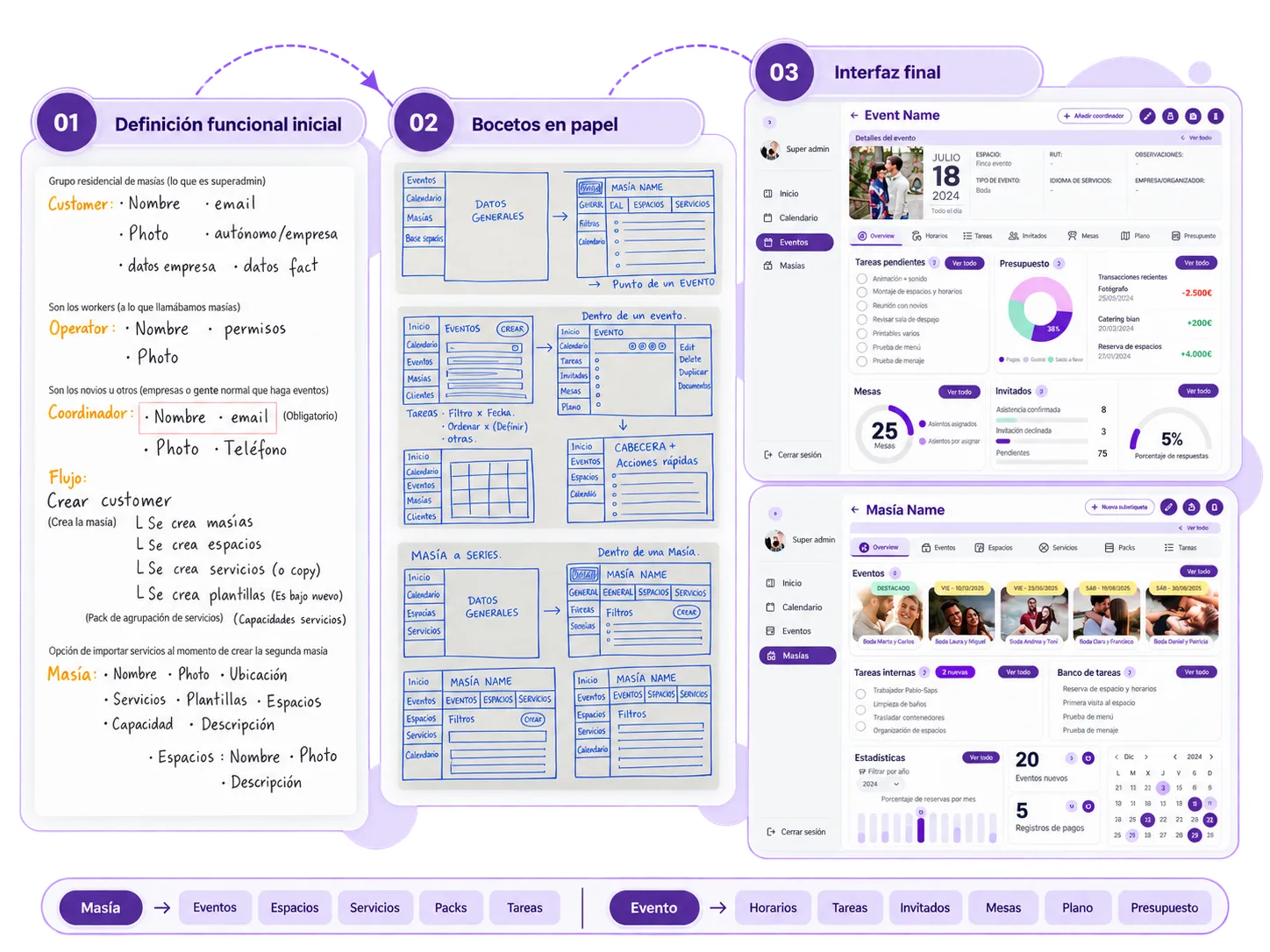
Navigation stopped trying to explain the whole product at once and started guiding the user according to the context they were working in.
03 Designing by responsibility
The same platform shouldn't show the same thing to everyone
Wedify had to work for profiles with very different responsibilities and different levels of digital experience as well.
A Super Admin might need to access several organizations, masías, and events. Other profiles only needed to work with the masías or events assigned to them. The couple, on the other hand, didn’t need to understand the business’s internal structure: they needed to organize their own event.
That’s why the solution wasn’t just about hiding buttons based on permissions. Access, navigation depth, and the entry information were all adapted to each person’s actual scope.
The interface also relied on clear hierarchies, recognizable iconography, visible states, and contextual help to reduce the need to learn the system before being able to use it.
Accessing only the context that applies

Changing the entry information too
The same logic carried over to the dashboards.
The goal was for each profile to start with the information most useful for their work, avoiding forcing every user through the same generic view.
Global view , Operational management , Organizing your own event

Designing by responsibility reduced noise without creating a different product for each profile: the foundation was the same, but the context changed.
04 Services and Packs
Turning the product's most complex part into a progressive system
Services were one of the most complex flows in the previous platform.
Setting up a venue’s offering could involve prices, costs, per-person values, VAT, categories, options, questions for the client, and relationships between different elements. The difficulty was enough that, in practice, the owner of Plan de Bodas ended up loading most of that information for their clients.
In the redesign, we didn’t try to eliminate that complexity. We organized it into a progressive, reusable structure.

Starting with reusable pieces
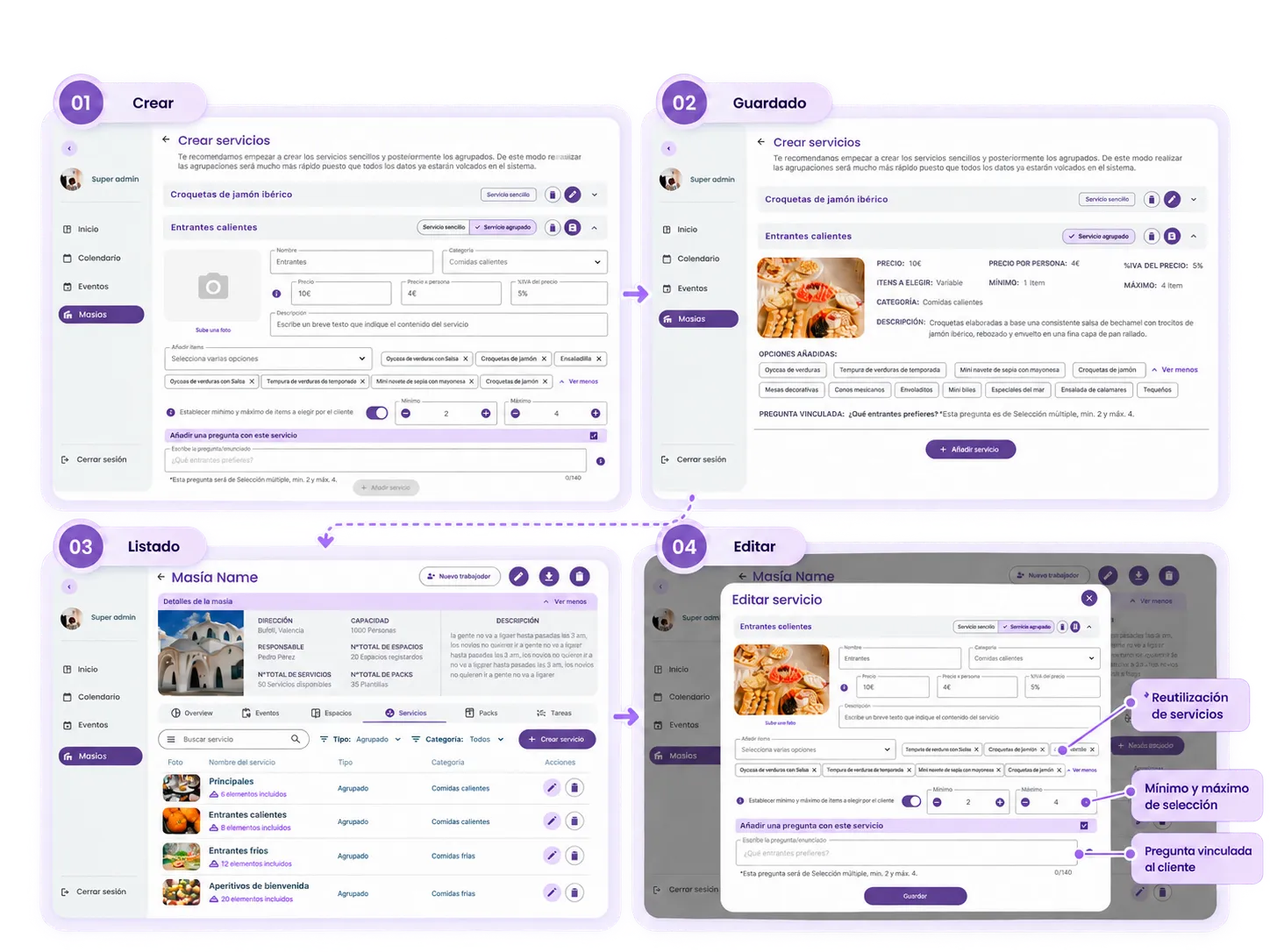
Simple service
The first level is the simple service: an independent piece that can later be reused within larger structures.
From a single interface, you could define data like name, category, image, price, cost, per-person values, VAT, and description.
Once saved, the service became available within the Masía’s catalog, where it could later be viewed, edited, and reused.
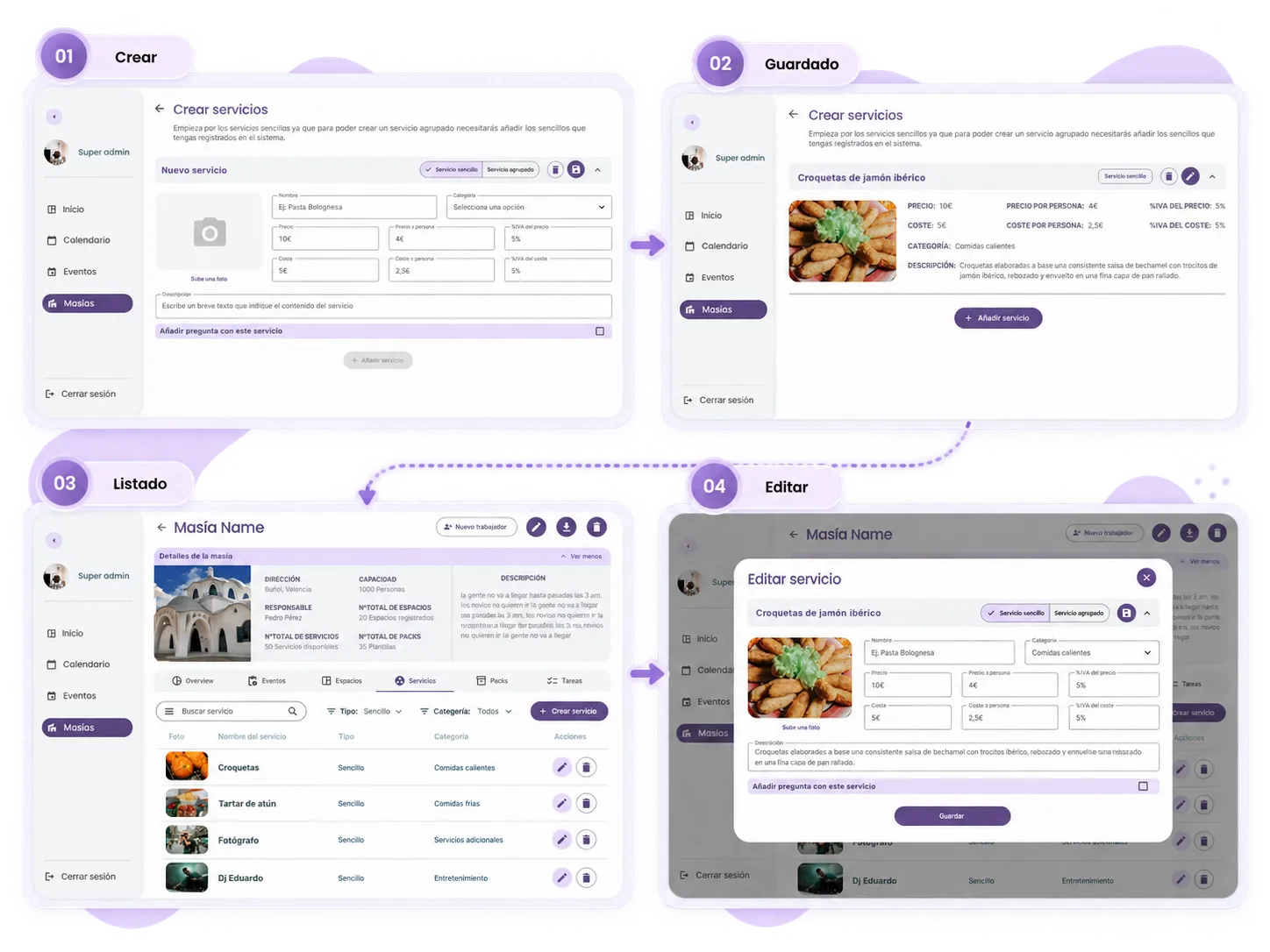
Composing without re-entering the same information
Grouped service
Grouped services were built from simple services that were already registered in the system.
This dependency mattered: the base pieces were created first, and could later be combined without re-entering the same information.
Besides selecting which services were part of the grouping, the professional could define rules for interacting with the client. The minimum and maximum values determined how many options could be chosen, and the service’s configuration determined the type of associated question: Yes/No, single choice, or multiple choice within a range.
The complexity stayed in the system, but it was turned into explicit decisions within the flow.
Scaling up to a full offering
Pack
Once the simple and grouped services were created, the Masía could build Packs with a more complete offering.
A Pack could combine elements from different categories — for example catering, decoration, photography, or entertainment — and bring them together into a single proposal.
Besides the included services, the configuration also covered commercial information like price, cost, per-person values, VAT, and the expected level of interaction with the client.
This way, the offering could be built in layers and reuse work already configured instead of starting from scratch for every event.
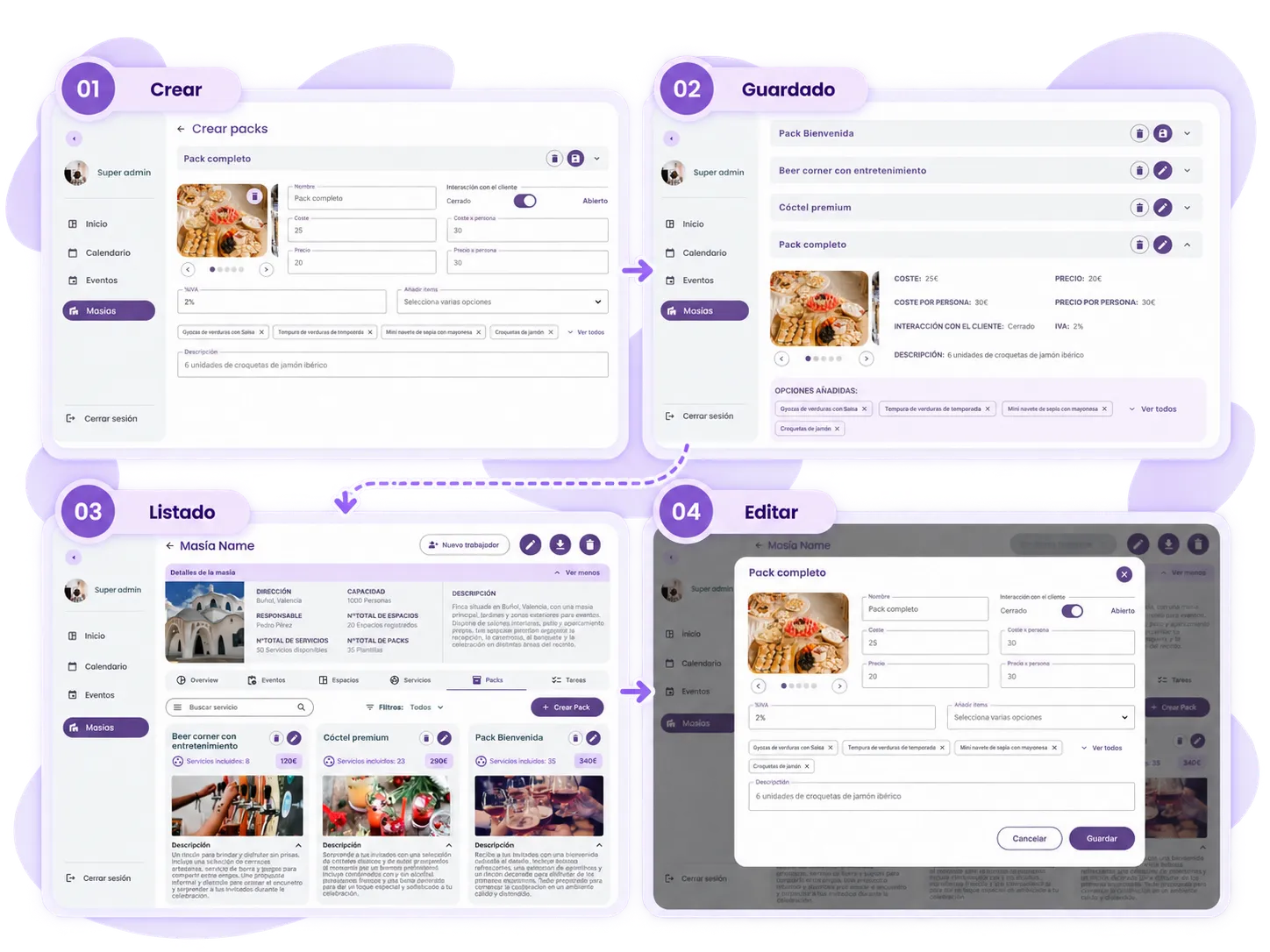
The solution wasn’t about artificially simplifying the offering, but building it in layers: create once, reuse, and combine.
05 Self-service invitations
Integrating a task that used to live outside the platform
Wedding invitations weren’t part of the old platform.
The owner of Plan de Bodas offered them as an additional service, and it was he who put them together for clients.
In Wedify, we integrated that process inside the event itself, so the couple could choose a base, customize it, and manage the result from the same product.
We designed three templates with different styles. From the event page, the couple could select one and fill in content like names, dates, locations, transportation, the celebration, attire, photos, and RSVP.
The final result also needed to be viewable from Mobile, something especially important for an invitation that guests would usually receive and open from their phone.
A task that used to depend on the vendor became part of the client's own experience.
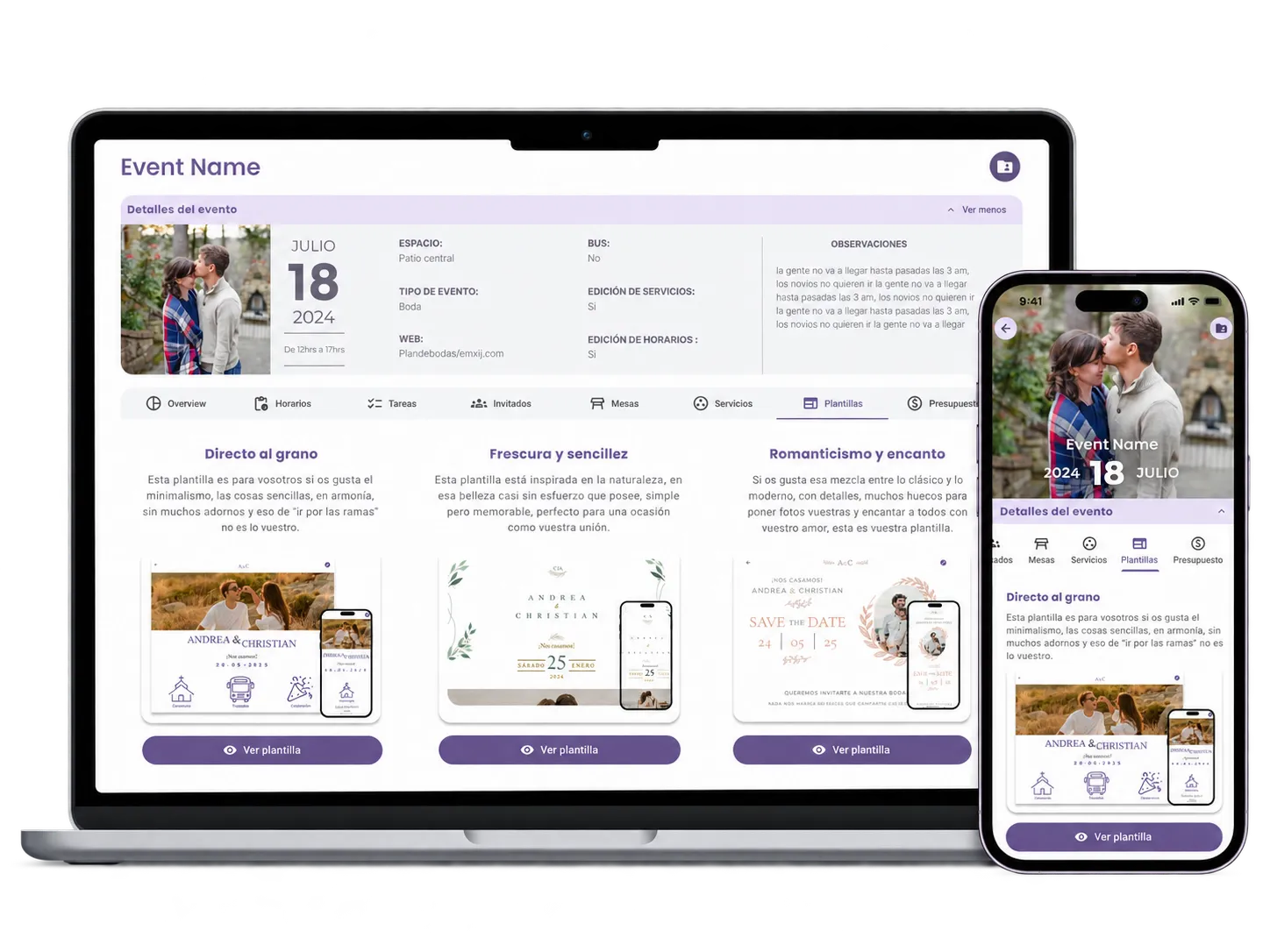
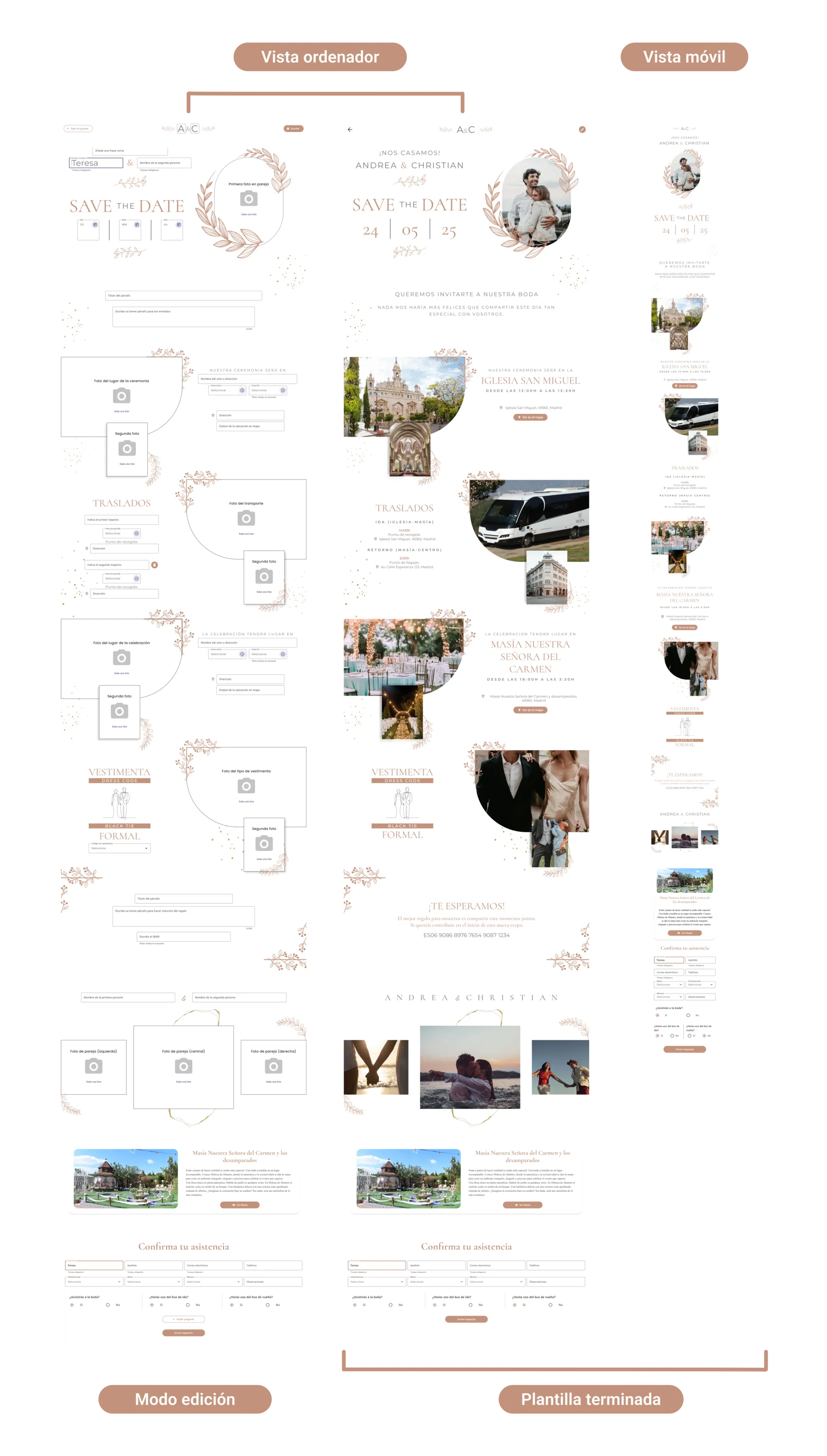
Integrating invitations into Wedify expanded the couple’s self-service and kept another part of the event’s organization within the same environment.
06 Result + implementation
A clearer foundation to keep building the product
The redesign turned a hard-to-learn platform into a system organized around contexts, responsibilities, and reusable pieces.
The new architecture made it possible to separate global management from the operations of each Masía and each Event. Access and dashboards were adapted to different levels of responsibility, while complex flows like Services and Packs were structured progressively.
The work covered both Web and Mobile, and also included client-facing experiences, such as editing invitations within the event itself.
01 Contextual architecture
Features appear within the entity they belong to, instead of all competing within a global navigation.
02 Experience by responsibility
The product changes access depth and entry information depending on each profile's scope.
03 Reusable configuration
Simple services, grouped services, and Packs make it possible to build complex offerings from previously configured pieces.
04 More self-service
Features like invitations become integrated into the clients' own experience.
Design and implementation in parallel
To make implementation easier, we worked on top of Material Design, and I customized a Flutter theme to adapt Wedify’s visual language.
I didn’t build a standalone Design System from scratch. The foundation was Material Design: I configured the theme, customized components when needed, and we reviewed several times how that configuration translated into the real interface.
Some decisions couldn’t be resolved through the theme alone and needed specific adjustments from development. That collaboration was part of the everyday work between design and code.
I worked as the lead Product Designer, with occasional support from another designer to speed up part of the visual production, and with final review/refinement on my end, in collaboration with Samuel and the development team.
Before my involvement ended, I was able to see parts of the product implemented, such as access, some dashboards, and the invitation templates. However, I left the project before the complete platform was finished.
What I learned
Simplifying a complex SaaS doesn’t mean removing features, but deciding how they’re grouped, when they appear, and who they’re relevant for.
Wedify forced me to work with real complexity: multiple user levels, related entities, and flows where one piece could become part of a larger one.
The main takeaway was understanding that an interface can feel much simpler without reducing the product’s capability, as long as the architecture, context, and hierarchy help surface each decision at the right moment.